
1.5 KiB
Executable File
Add identifications to the product
-
Go to Sales -> Products -> Products
-
Create a new product
-
Go to the Sales tab and select the Required Identification option.
-
A tree will be enabled in which you must configure the required identification category (ies) for the product without repeating them.

-
If you define any category as optional, a wizard will appear when confirming the order to confirm whether the identifications are correct and continue with the process.
-
Save

Validate order with identification products
-
Go to Sales -> Orders -> Quotations
-
Create a new order and add any products that require identification to the lines.
-
Once the order is confirmed, the selected customer's ID numbers will be validated to see if they have the categories required for the added product(s).
-
If the partner does not have all the categories in their valid identification number (Validity Date), a message will be displayed with the missing categories (and their message defined in the product) to validate.
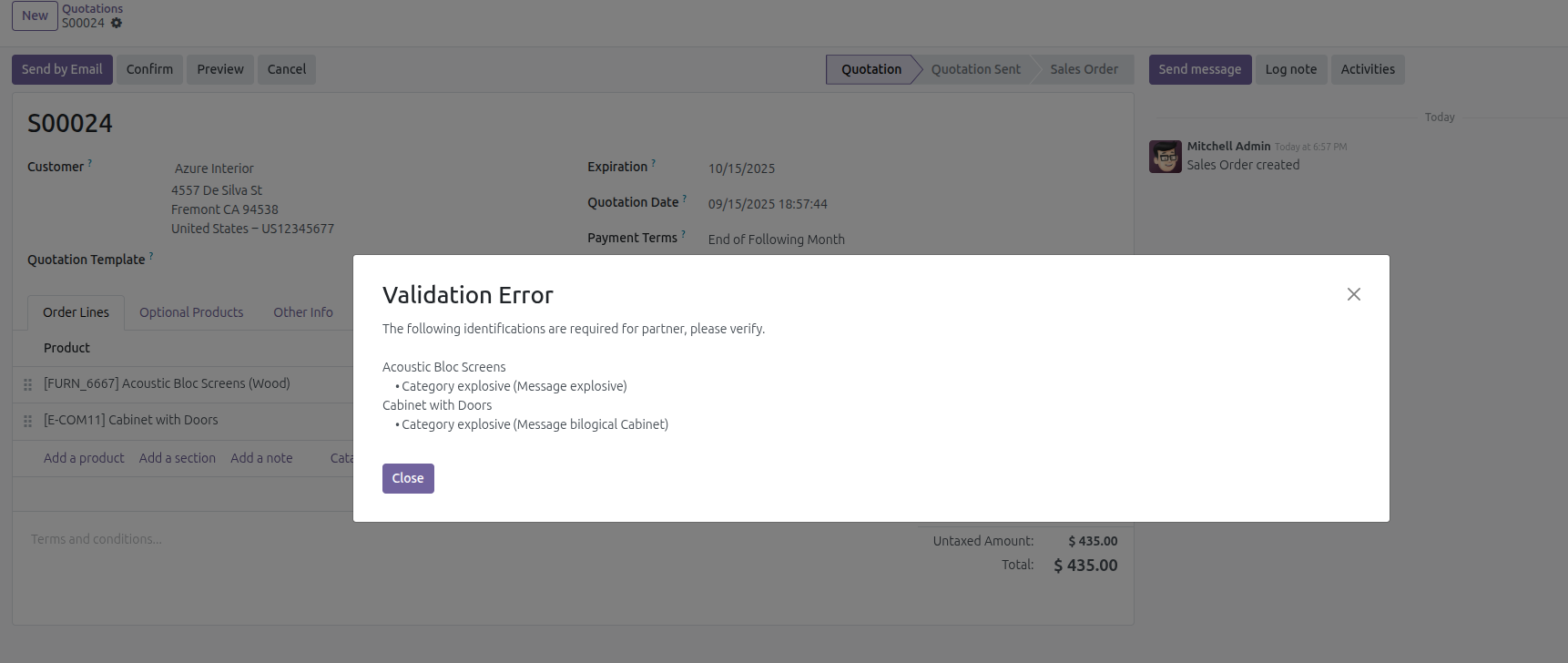
-
When validating the required categories, the optional ones are validated, for which a wizard will be displayed to confirm.

-
If the customer has all the correct identifications, then the order confirmation follows its normal flow.

