
36 lines
1.5 KiB
Markdown
Executable File
36 lines
1.5 KiB
Markdown
Executable File
Extends the name search feature to use additional, more relaxed matching
|
|
methods, and to allow searching into configurable additional record
|
|
fields.
|
|
|
|
The name search is the lookup feature to select a related record. For
|
|
example, selecting a Customer on a new Sales order.
|
|
|
|
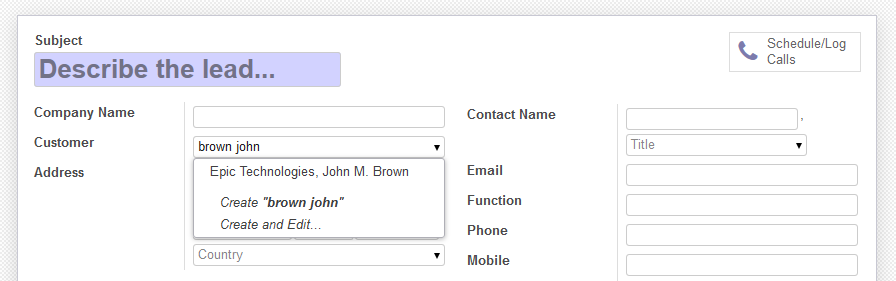
For example, typing "john brown" doesn't match "John M. Brown". The
|
|
relaxed search also looks up for records containing all the words, so
|
|
"John M. Brown" would be a match. It also tolerates words in a different
|
|
order, so searching for "brown john" also works.
|
|
|
|
|
|
|
|
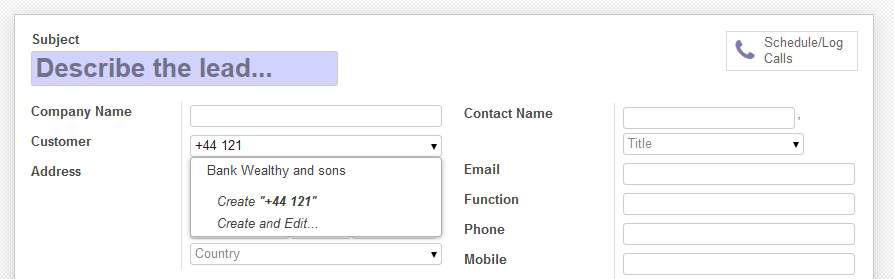
Additionally, an Administrator can configure other fields to also lookup
|
|
into. For example, Customers could be additionally searched by City or
|
|
Phone number.
|
|
|
|
|
|
|
|
How it works:
|
|
|
|
Regular name search is performed, and the additional search logic is
|
|
only triggered if not enough results are found. This way, no overhead is
|
|
added on searches that would normally yield results.
|
|
|
|
But if not enough results are found, then additional search methods are
|
|
tried. The specific methods used are:
|
|
|
|
- Try regular search on each of the additional fields
|
|
- Try ordered word search on each of the search fields
|
|
- Try unordered word search on each of the search fields
|
|
|
|
All results found are presented in that order, hopefully presenting them
|
|
in order of relevance.
|